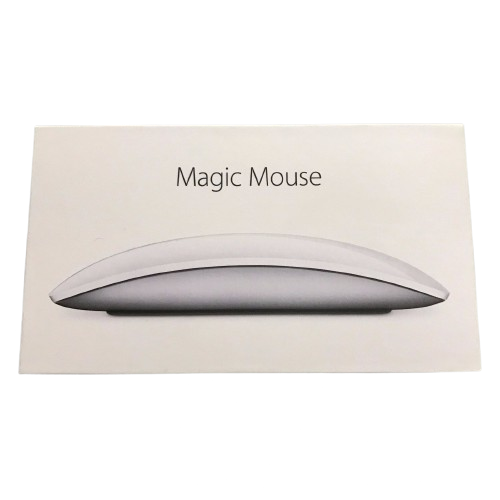
The Apple Magic Mouse 2 is a sleek wireless mouse designed for Mac users who want a clean, minimalist desktop setup combined with Apple's signature Multi-Touch surface and gesture controls. It uses Bluetooth for wireless connectivity and features a built-in rechargeable battery, eliminating the need for disposable batteries.
Unlike a conventional mouse that relies mainly on a physical scroll wheel, the Magic Mouse 2 uses its smooth Multi-Touch surface to let you scroll, swipe between pages, navigate through content and perform other gestures. This makes it particularly well suited to the Apple ecosystem and users who appreciate a simple, uncluttered workspace.
The Magic Mouse 2 is especially useful for MacBook, iMac and Mac desktop users, as well as students, professionals, designers, office users and anyone looking for a compact wireless mouse that fits naturally into an Apple-focused setup.
The standout feature of the Apple Magic Mouse 2 is its Multi-Touch surface.
Instead of using a traditional scroll wheel, the top surface recognizes different finger movements and gestures. You can scroll through documents and websites, swipe between pages and use supported gestures to navigate your Mac.
This gives the mouse a much cleaner appearance while also providing a more gesture-focused way of interacting with your computer.
You can use gestures such as:
The Magic Mouse 2 connects wirelessly to compatible Mac computers using Bluetooth.
This means there is no traditional mouse cable running across your desk while you're using it, helping maintain the clean setup that Apple accessories are known for. Apple also designed the Magic Mouse 2 to pair automatically with a Mac during initial setup using its charging cable.
For users with a MacBook or iMac, the wireless connection makes the Magic Mouse 2 particularly convenient for everyday productivity.
The Magic Mouse 2 has a built-in rechargeable lithium-ion battery, meaning you don't need to keep replacing AA or AAA batteries.
Apple states that a full charge can provide about a month or more of use, depending on usage. Apple also states that a full charge takes approximately 2 hours.
That makes the Magic Mouse 2 convenient for everyday office work, studying, browsing and general computer use without constantly worrying about batteries.
The Magic Mouse 2 is instantly recognizable thanks to its low-profile, smooth and minimalist design.
Its slim body fits easily into laptop bags, backpacks and desk setups without taking up much space.
Apple lists the dimensions as:
At just 99g, it is a lightweight accessory that's easy to carry alongside a MacBook.
Apple redesigned the bottom of the Magic Mouse 2 with an optimized foot design intended to help it glide smoothly across a desk with less resistance.
This makes movement feel smooth during everyday tasks such as browsing, editing documents, working on spreadsheets and navigating applications.
Setting up the Magic Mouse 2 with a compatible Mac is straightforward.
The included charging cable can be connected between the mouse and the Mac to establish the initial connection. Once paired, you can disconnect the cable and continue using the mouse wirelessly through Bluetooth.
This is particularly convenient for users who don't want to deal with separate Bluetooth pairing menus and complicated setup processes.
The Magic Mouse 2 is a natural accessory for people using a MacBook Air or MacBook Pro.
Its minimalist appearance matches Apple's laptop design language, while the Multi-Touch gestures provide additional navigation options compared with a basic wireless mouse.
It's useful for:
If you're building a clean Apple desktop setup around an iMac or Mac desktop, the Magic Mouse 2 fits naturally into the ecosystem.
Its wireless design helps keep the desk free from unnecessary cables, while its slim profile takes up relatively little space.
For users who care about matching accessories across their setup, the Magic Mouse 2 pairs visually with Apple's minimalist keyboards and displays.
The low-profile design gives the Magic Mouse 2 a distinctive feel compared with conventional ergonomic mice.
The smooth surface allows your hand to move naturally across the top while the Multi-Touch system handles scrolling and gestures.
However, comfort is highly personal.
Brutally honest: if you prefer a tall, ergonomic mouse with a pronounced palm rest, the Magic Mouse 2 may not be your ideal mouse. Its design prioritizes Apple's slim aesthetic and Multi-Touch interaction rather than traditional ergonomic shaping.
The Magic Mouse 2 also supports secondary click functionality, allowing you to perform right-click actions on compatible Mac systems. Apple documents secondary clicking as one of the supported Magic Mouse gestures.
This means you still have access to familiar contextual menus while using the Multi-Touch surface.
Because the Magic Mouse 2 weighs only 99g, it is easy to carry with a MacBook or other compatible setup.
Its slim shape makes it particularly convenient for:
The Magic Mouse 2 is more than a stylish accessory.
It can be used for everyday productivity tasks such as document editing, browsing, presentations, spreadsheets, research and general computer navigation.
For students using a MacBook for school or university work, the wireless design and Multi-Touch gestures can make navigation more convenient.
Mac users working with creative applications can also benefit from the Magic Mouse 2's precise pointer control and Multi-Touch navigation.
It's suitable for general use with applications for:
For highly demanding creative workflows, however, some professionals may prefer a dedicated ergonomic or multi-button mouse.
Product: Apple Magic Mouse 2
Type: Wireless rechargeable mouse
Connectivity: Bluetooth
Surface: Multi-Touch
Battery: Built-in rechargeable lithium-ion battery
Battery Life: About one month or more between charges
Charging: Lightning
Full Charge: Approximately 2 hours
Height: 2.16 cm
Width: 5.71 cm
Depth: 11.35 cm
Weight: 99g
Wireless: Yes
Secondary Click: Yes
Compatible Systems: Bluetooth-enabled Mac with compatible macOS; selected iPads support Magic Mouse 2 depending on software/model compatibility.
Apple Magic Mouse 2
Lightning charging cable depending on the specific retail package/version. Apple's original Magic Mouse 2 documentation specifies a Lightning charging connection.
The main reason to choose the Apple Magic Mouse 2 is its combination of minimalist design, wireless Bluetooth connectivity, rechargeable battery and Multi-Touch gestures.
Its biggest advantages include:
The Magic Mouse 2 looks fantastic and works particularly well within Apple's ecosystem, but it isn't the perfect mouse for everyone.
Its biggest selling point is the Multi-Touch surface and Apple integration, not having a huge number of buttons or an aggressively ergonomic shape.
If you want a mouse with lots of programmable buttons, a thumb rest, adjustable DPI controls or a highly sculpted ergonomic design, there are better alternatives.
And there's another important consideration with the Magic Mouse 2 specifically: it uses a Lightning charging port on the underside. That means you can't use it while it is physically connected for charging because of the location of the port.
That is one of the Magic Mouse 2's most criticized design decisions.
But if you're already using a Mac and want a clean, lightweight Apple accessory with excellent gesture support, the Magic Mouse 2 still makes a lot of sense.
The Magic Mouse 2 is a strong choice for:
MacBook users who want a wireless mouse that fits naturally into their Apple setup.
iMac users looking for an Apple-branded desktop mouse.
Students who want a compact mouse for school, university and everyday productivity.
Office workers who want a clean wireless desktop setup.
Designers and creatives who appreciate Multi-Touch navigation and Apple's minimalist hardware.
Remote workers who want a portable mouse to use between different workspaces.
Apple ecosystem users who want accessories that match their Mac setup.
Minimalist desk enthusiasts who want a simple, cable-free desktop.
If you're looking for an Apple Magic Mouse 2 in Kenya, it's a strong option for Mac users who want a compact wireless mouse with a rechargeable battery and Multi-Touch gesture controls.
For buyers in Nairobi, the Magic Mouse 2 is particularly suited to MacBook users, iMac owners, students, professionals, designers, office workers and anyone building a clean Apple workstation.
Whether you're searching for Apple Magic Mouse 2, Magic Mouse 2 Kenya, Apple wireless mouse Kenya, Apple Bluetooth mouse Nairobi, rechargeable Apple mouse, Multi-Touch mouse Kenya or MacBook mouse Nairobi, the Magic Mouse 2 remains a recognizable Apple accessory.
The Apple Magic Mouse 2 is a stylish, lightweight and highly distinctive wireless mouse built around Apple's Multi-Touch interface.
Its Bluetooth connectivity, rechargeable battery, 99g weight, smooth gliding design and gesture controls make it an excellent companion for compatible Mac users.
Its biggest weakness is also pretty obvious: the Lightning charging port is located underneath the mouse, meaning you cannot comfortably continue using it while it is charging.

CBD Branch - Jitihada Complex, Taveta Road.
1st Floor, Shop F14
-




 View Cart